Edge Routing
The EdgeRouter calculates orthogonal, octilinear, or curved edge paths for a diagram’s edges. The positions of the nodes in the diagram are not changed by this algorithm. The algorithm supports routing all edges at once, as well as incremental scenarios where edges added later are drawn to fit the existing diagram. It can be used to route edges in both flat and grouped graphs.
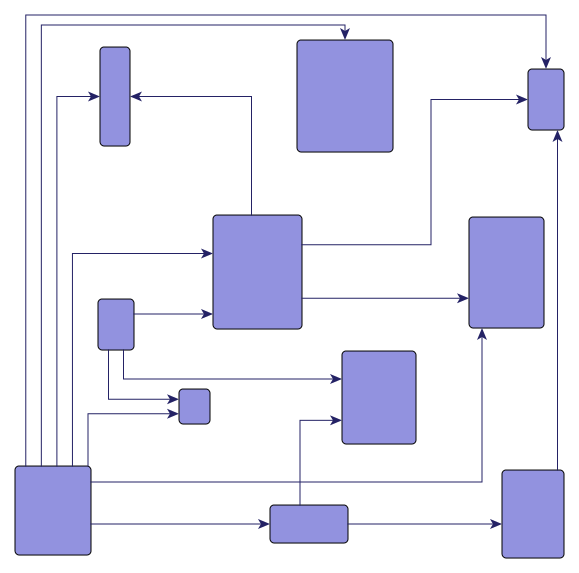
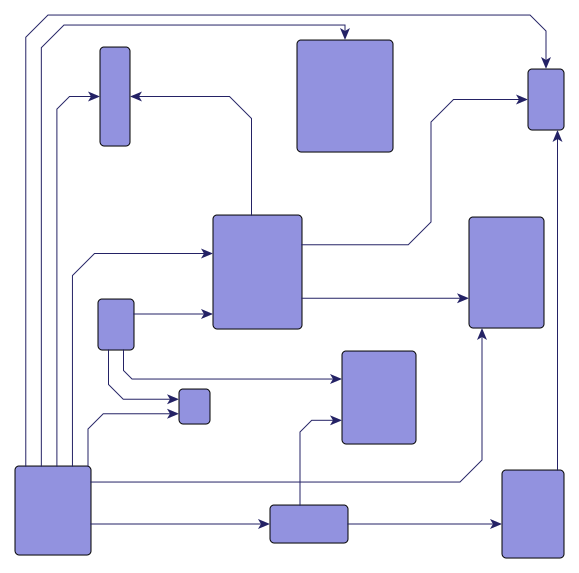
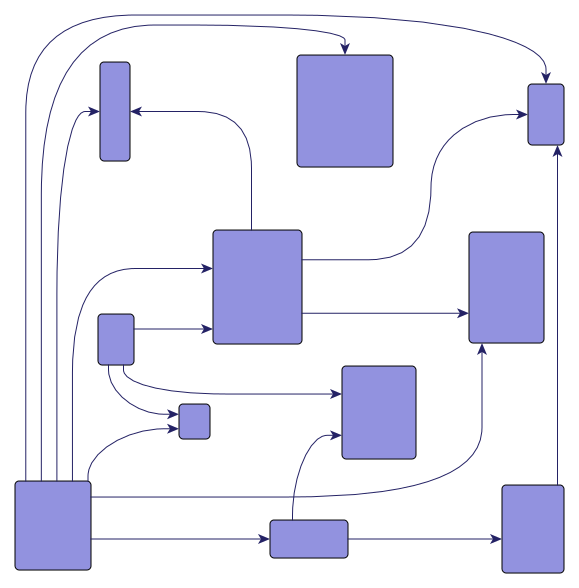
Edges that are routed orthogonally have edge paths consisting of horizontal and vertical segments. In octilinear routing, the slope of each segment of an edge path is a multiple of 45 degrees. Curved edge routes are represented by cubic Bézier splines.
Relevant Classes
The following table lists the relevant classes for the edge routing algorithm.
| Class Name | Description |
|---|---|
Main algorithm. |
|
Layout data for the EdgeRouter class. It is used to specify layout options for individual edges. See Basic Options. |
|
Provides edge-related layout options. For example, configuration of minimum distances and cost settings. See Basic Options. |
|
Configures cost settings that are queried during the edge routing process. See Advanced Options. |
Basic Options
The EdgeRouter provides a set of options that affect its routing behavior. This section highlights the most important options.
Several edge-related routing options can be specified using the descriptor class EdgeRouterEdgeDescriptor. An EdgeRouterEdgeDescriptor instance can be specified individually for single edges via layout data using the property edgeDescriptors. If an individual descriptor for an edge is not specified, the default EdgeRouterEdgeDescriptor instance that is registered with EdgeRouter.defaultEdgeDescriptor will be used.
The class EdgeRouterEdgeDescriptor can be used to configure edge-related layout and drawing options. For example, the following options can be set:
-
routing style
-
preferred minimum distance between edge segments
-
preferred minimum length of the first and last edge segment, respectively
-
costs
Routing Style
- EdgeRouterEdgeDescriptor.routingStyle
-
Determines whether the edge routing algorithm creates an orthogonal, octilinear, or curved edge path.
Distances and Lengths
- minimumNodeToEdgeDistance
-
Specifies the preferred minimum distance between edge segments and node sides.
- minimumEdgeDistance
-
Specifies the preferred minimum distance between any two edge segments.
- minimumFirstSegmentLength
-
Specifies the preferred minimum length of the first edge segment at the source.
- minimumLastSegmentLength
-
Specifies the preferred minimum length of the last edge segment at the target.
Scope
The EdgeRouter can be restricted to a subset of the edges. The subset to route can be specified using layout data through the sub-data accessible via the property scope. This sub-data offers multiple ways to specify the subset. The simplest way is to directly define the set of edges to route with the property edges. Alternatively, you can specify a subset of nodes whose connected edges should be routed with the property incidentNodes. Additionally, you can assign scope policies, which allow you to specify that routes already deemed good should not be changed.
Routing on a Grid
The EdgeRouter is able to route the horizontal and vertical segments of orthogonal, octilinear, or curved edge paths along the lines of a grid.
- gridSpacing
-
Specifies the spacing of the grid on which horizontal and vertical segments are placed.
Advanced Options
In addition to the basic settings described previously, you can achieve more advanced use cases with the following settings.
Scope Policies
In cases where edge paths already exist, it may be desirable to retain them if they are already suitable. Therefore, the EdgeRouter offers fine-grained scope policies, per edge, that allow you to keep the existing edge path if it already meets certain criteria, such as having no overlaps with other elements or using the correct routing style.
This provides an intelligent, automatic selection of edges that need to be routed. It can be applied to a wide range of interactive scenarios, such as automatically routing necessary edges after user interactions like node dragging or group node collapsing/expanding.
- edgeMapping
- incidentNodeMapping
-
Indicates whether the edge is routed unconditionally or if the existing path is considered to decide whether routing is necessary.
- PATH
-
The algorithm always calculates a new path.
- PATH_AS_NEEDED
-
The algorithm checks the given sketch and calculates a completely new path if a criterion is violated.
- SEGMENTS_AS_NEEDED
-
The algorithm checks the given sketch and tries to change the path locally (i.e., some segments) if a criterion is violated. The setting sketchViolationCost further determines the importance of the sketch.
- IGNORE
-
The algorithm does not calculate a new path.
|
Note
|
Specifying the scope through multiple properties of EdgeRouterScopeData is supported. If different scope policies are assigned to an edge, the most permissive one is chosen. It is recommended to use only one property. |
Octilinear Routing Style Settings
- preferredOctilinearSegmentLength
- maximumOctilinearSegmentRatio
-
These options provide fine-grained control over octilinear edge routing. They determine the preferred length of the octilinear segments and the ratio between the octilinear segment length and the length of the horizontal or vertical segments.
Minimum Distance to Node Corners
- minimumNodeCornerDistance
-
Determines the preferred minimum distance between an incident edge and the corners of its node at the side where the edge connects.
Costs
- edgeRouterCosts
-
Configures the costs that are considered during edge routing. You can specify costs for various situations, such as when two edge paths cross or when an edge path crosses a node. A higher cost for a specific situation encourages the edge routing algorithm to avoid it, seeking alternative edge paths instead.
Monotonic Path Restrictions
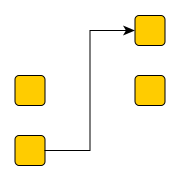
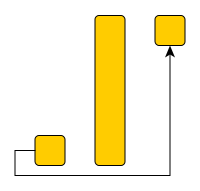
EdgeRouter supports edge routing such that the generated paths adhere to so-called monotonic path restrictions. This means that, ideally, each vertical and/or horizontal segment of an edge path is directed in the same direction, from the source node to the target node. Thus, when following the edge path, there is never a “turning back” towards the source node, but instead a steady movement towards the target node.
Monotonic edge paths are useful when routing edges in UML class diagrams, inheritance diagrams, or tree-like organization charts. They can also achieve edge routes similar to those produced by a hierarchical or tree layout, see Edge Routes Similar to Other Layout Algorithms.
The following property from class EdgeRouterEdgeDescriptor configures monotonic path generation:
- monotonicPathRestriction
-
Specifies the kind of monotonic path restrictions for edges. The following restrictions are available:
- VERTICAL
-
If possible, each vertical edge segment is directed from the source node to the target node.
- HORIZONTAL
-
If possible, each horizontal edge segment is directed from the source node to the target node.
- BOTH
-
If possible, each edge segment (both horizontal and vertical) is directed from the source node to the target node.
- NONE
-
The directions of the segments are not restricted.
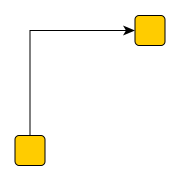
The following figures illustrate the results of specifying monotonic edge path restrictions. All figures have specified restrictions in the vertical direction, i.e., each vertical edge segment shall be directed from the source node to the target node.
Edge Routes Similar to Other Layout Algorithms
Some use cases require resembling the routing style of a full layout such as the HierarchicalLayout or TreeLayout. This can be useful, for example, when individual edges in an existing layout need to be rerouted or inserted without altering the rest of the drawing. You can use the Scope property to specify which edges should be affected.
The following recommendations help you find suitable setups to resemble the routing style of the main layout algorithms that produce non-straight-line routes. Note that the EdgeRouter typically does not reproduce exactly the same routing style and does not support a perfectly uniform port assignment as, for example, the HierarchicalLayout or TreeLayout do. Furthermore, both the runtime and the quality of the full layouts' integrated routing are usually significantly better.
For layout algorithms that support an incremental layout mode (such as the HierarchicalLayout), using this mode may sometimes be a preferable alternative. It allows to integrate new (incremental) elements into a graph while keeping the existing parts, which serve as a sketch, only slightly altered.
Routes Similar to the Hierarchical Layout
The edge routes of the HierarchicalLayout adhere to a strict flow direction. To get similar edge routes with the EdgeRouter you can specify monotonic path restrictions. For example, if the HierarchicalLayout has a top-to-bottom orientation, use a vertical monotonic path restriction that ensures that edges primarily point downwards.
In addition, specify suitable port candidates to ensure that edges connect to the nodes at sides consistent with the flow direction. For top-to-bottom orientation, this means defining port candidates at the bottom for the source end and at the top for the target end.
If the HierarchicalLayout uses polyline or octilinear edge routes, set the routingStyle property to OCTILINEAR (a general polyline style is not supported). It can also help to experiment with the preferredOctilinearSegmentLength setting. If the HierarchicalLayout uses curved edges, set routingStyle property to CURVED.
Routes Similar to the Orthogonal Layout
The default EdgeRouter settings already produce routes that are close to that of the OrthogonalLayout if you choose similar minimum distances and grid spacing. If the OrthogonalLayout uses oriented edges, you can also specify monotonic path restrictions. For example, if the OrthogonalLayout has a top-to-bottom orientation, use a vertical monotonic path restriction to ensure that edges primarily point downwards.
Routes Similar to the Tree Layout
The TreeLayout offers different routing styles with various port distributions. Most of them can be resembled by specifying suitable port candidates to ensure that edges connect to the nodes at the desired sides. To obtain monotonic edge routes, specify monotonic path restrictions. For example, if the TreeLayout has a top-to-bottom orientation, use a vertical monotonic path restriction to ensure that edges point downwards (segments pointing to the left or right are also allowed). Additionally, specifying port or edge groups can help getting fork-style edge routes.
Labeling
The edge routing algorithm can be configured to consider both node labels and edge labels during routing. It takes into account the size of node labels and labels of fixed edges — edges that are not routed. If there is enough space, the algorithm generates edge paths that do not cross these labels in the resulting diagram. Additionally, labels can be placed using the generic labeling support as a postprocessing step.
- nodeLabelPlacement
-
Specifies the policy that determines how the edge router considers or places node labels.
- edgeLabelPlacement
-
Specifies the policy that determines how the edge router considers or places edge labels. Only the labels of routed edges are placed. The labels of fixed edges are only considered as obstacles for the edge paths.
Grouped Graphs
EdgeRouter supports edge routing in grouped graphs without additional setup. It recognizes group nodes and folder nodes and calculates edge paths to nodes grouped within group nodes.
Incremental Layout
EdgeRouter supports incremental routing through the Scope feature. See the description above.
Furthermore, the routing policy setting is relevant for incremental routing. If it is not clear which edges the algorithm should route, an automatic selection can be realized with edge router scope policies PATH_AS_NEEDED or SEGMENTS_AS_NEEDED. When only routing segments locally as needed, the importance of the provided sketch relative to other constraints may be specified with the property EdgeRouterCosts.sketchViolationCost.
Port Candidates
EdgeRouter supports port candidates at both nodes and edges. The general concept and setup of port candidates are presented in Restricting Port Locations.
Using free port candidates for the ends of an edge, you can specify which side of the source or target node an edge path must connect to. Using fixed port candidates for the ends of an edge, you can specify the side of the node to which an edge must connect, and also the exact position of the port.
In addition to supporting port candidates at edges, EdgeRouter also supports port candidates at nodes. These represent a set of allowed anchor locations where the incident edges can connect to the node.
Port candidates can be specified using the properties of the sub-layout data ports. For more details on the port candidate concept, including the matching of port candidates at nodes and edges, refer to Restricting Port Locations.
Edge Grouping
The EdgeRouter supports grouping multiple edge ends, so they are anchored at the same location. You can specify this grouping individually for both source and target ends using the properties sourceGroupIds and targetGroupIds, respectively. Edge and Port Grouping describes the general setup for edge groups.
Bus-style routing
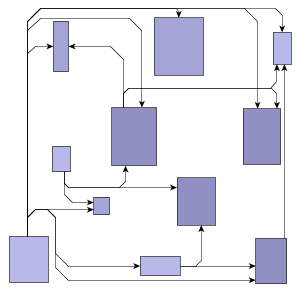
In addition to edge and port grouping, the EdgeRouter also supports orthogonal bus-style routing. A bus is a segment shared by multiple edges. Shorter segments connect the edges to the actual nodes. The bus consists of one or more backbone segments, which are always routed orthogonally. The shorter segments that connect to the actual nodes can also be routed using the octilinear style, like any other edge. Bus-style routing is a suitable solution for parts of a diagram where each node is connected to every other node (complete sub-graphs).
Usage
To define a bus, use the EdgeRouterData<TNode, TEdge, TNodeLabel, TEdgeLabel>.buses property. On the object returned from that property, add one or more EdgeRouterBusDescriptor instances to create a new bus. The returned item collection mapping allows you to conveniently define which edges should be part of the created bus. The descriptor instance serves as a way to configure the settings of the bus itself. The multipleBackboneSegments property allows you to specify whether a bus may consist of multiple backbone segments (default) or just a single one. The following code example illustrates how to define two different buses.
const graph = this.getMyGraph()
const edgeRouter = new EdgeRouter()
const edgeRouterData = new EdgeRouterData()

// The first bus consists of all edges that are red (assuming the used edge style is PolylineEdgeStyle)
// - for this use case the simple predicate property is used
const firstBus = new EdgeRouterBusDescriptor({
  automaticEdgeGrouping: false
})
edgeRouterData.buses.add(firstBus).predicate = (edge: IEdge) =>
  (edge.style as PolylineEdgeStyle).stroke === Stroke.RED

// The second bus is defined by a given list of edges filled by some user-defined method
// - we use the appropriate Items property in this case
const secondBus = new EdgeRouterBusDescriptor()
secondBus.automaticEdgeGrouping = true
secondBus.minimumBackboneSegmentLength = 200
const secondBusEdges: ICollection<IEdge> = this.getSecondBusEdges()
edgeRouterData.buses.add(secondBus).items = secondBusEdges
// Apply the edge routing algorithm
graph.applyLayout(edgeRouter, edgeRouterData)Tables
EdgeRouter supports routing in layout grids without additional configuration. It recognizes layout grids and finds edge paths to nodes within grid cells. You can specify the grid using the layout data property layoutGridData.
Node Margins
EdgeRouter supports node margins as soon as they are declared. These can be specified through the EdgeRouterData<TNode, TEdge, TNodeLabel, TEdgeLabel>.nodeMargins property. The algorithm considers any specified additional padding around nodes. If space permits, it will generate edge paths that do not cross these areas in the resulting diagram. However, other constraints (e.g., port candidates) that have higher costs associated with them can cause edges to cross node margins.